

Printing Settings
Ce contenu n’est pas encore disponible dans votre langue.
SongbookPro provides functionality to print your songs and sets (or save them as PDF files). Sets can either be printed in full (i.e. a collection of songs as a single document) or as an overview, showing songs as a list or a table. Various options are available to customize the style of the output, which can be configured here.
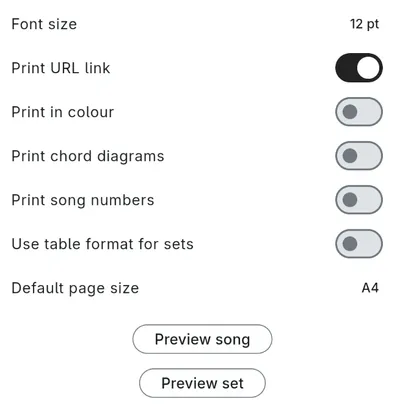
Font size - The default font size for the printed output.
Print URL link - If the song has a URL link configured, the link will be printed as a QR code on the song page.
Print in color - Controls whether the printed output uses the colors you have configured in the Song Display Settings.
Print chord diagrams - Controls whether chord diagrams are included for each song.
Print song numbers - Controls whether song numbers are included in the printed output, if configured for the song.
Use table format for sets - When enabled, set overviews will be printed as a table rather than a list.
Default page size - The default page size for the printed output, either A4 or Letter.
Previews
Section titled “Previews”To preview what the settings will look like, this settings page provides preview buttons that show a sample song and set.