
SongbookPro Update - Summer 2026
SongbookPro is now over 9 years old and in this time we’ve seen it’s popularity grow year on year. Throughout this time the look and feel of the app has generally remained the same, so it was long overdue for a refresh. We’re pleased to announce the launch of a new design for the SongbookPro app.
New design, same great app
The leading design decision during this update has been to keep the core functions of the app the same as you’ve grown to know and love. All the core controls and layouts are in the same place, so opening the app after updating will feel comfortably familiar. Instead, we’ve focused on updating the colors themes to give the app a more modern look and feel.
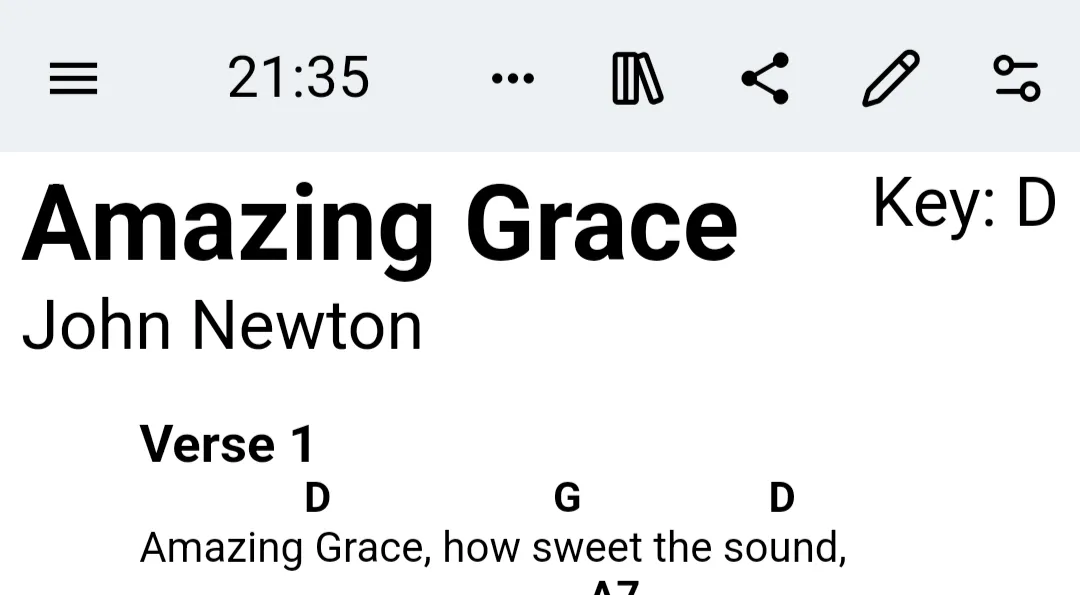
App bar updates
There are two key changes that have been made to the app bar, the new icon for the quick actions menu and a new way to switch between SongbookPro Groups libraries.
The quick actions menu (what used to be the clock icon) has now been replaced with a new icon: . We felt this icon better represents the purpose of the menu, as a menu for quickly adjusting settings around the current song being displayed.
We also have added a new library icon (for uses of SongbookPro Groups) to the app bar. This allows you to quickly switch between your local song library and the SongbookPro Groups library.
The new settings menu
Over the last 9 years, we’ve added lots of customization options to SongbookPro. This had resulted in the settings menu getting cluttered and not being organized in a very logical way. The key settings were split into ‘General’ and ‘Advanced’, and it was often a guessing game to find the setting you were looking for.
We’ve redesigned the settings menu from the ground up to be more logically organized and maintainable. The settings menu is now split into sections based on the area of the app the setting affects.
- Interface - All settings that control the main display of the app.
- Song Display - These settings control how songs/sets are displayed in the app.
- Live Buttons - Arranging live buttons and customizing their behavior.
- Pedals & Controllers - Foot pedals and MIDI settings.
- Chord Diagrams - Instrument selection and chord diagram display settings.
- Printing - Printing options for the app.
- Backup & Sync - Managing the sync system and creating/restoring backups.
- SongbookPro Groups - Logging into SongbookPro Groups and managing libraries you are part of.
More details on the new settings menu can be found in our documentation.
We hope you find this new menu easier and quicker to find what you’re looking to change.